Android Activity - Intent
- To start an Activity programmatically
- we first create an Intent object
- Intents are messaging objects used to request an action from another component from the same or other applications
- The target Activity and any other additional data required can be specified in the Intent object.
// In the source Activity (e.g., MainActivity.java)
Intent intent = new Intent(this, TargetActivity.class);
// Optionally, you can add extra data to the Intent
intent.putExtra("key", "test");
Requesting Activity launch
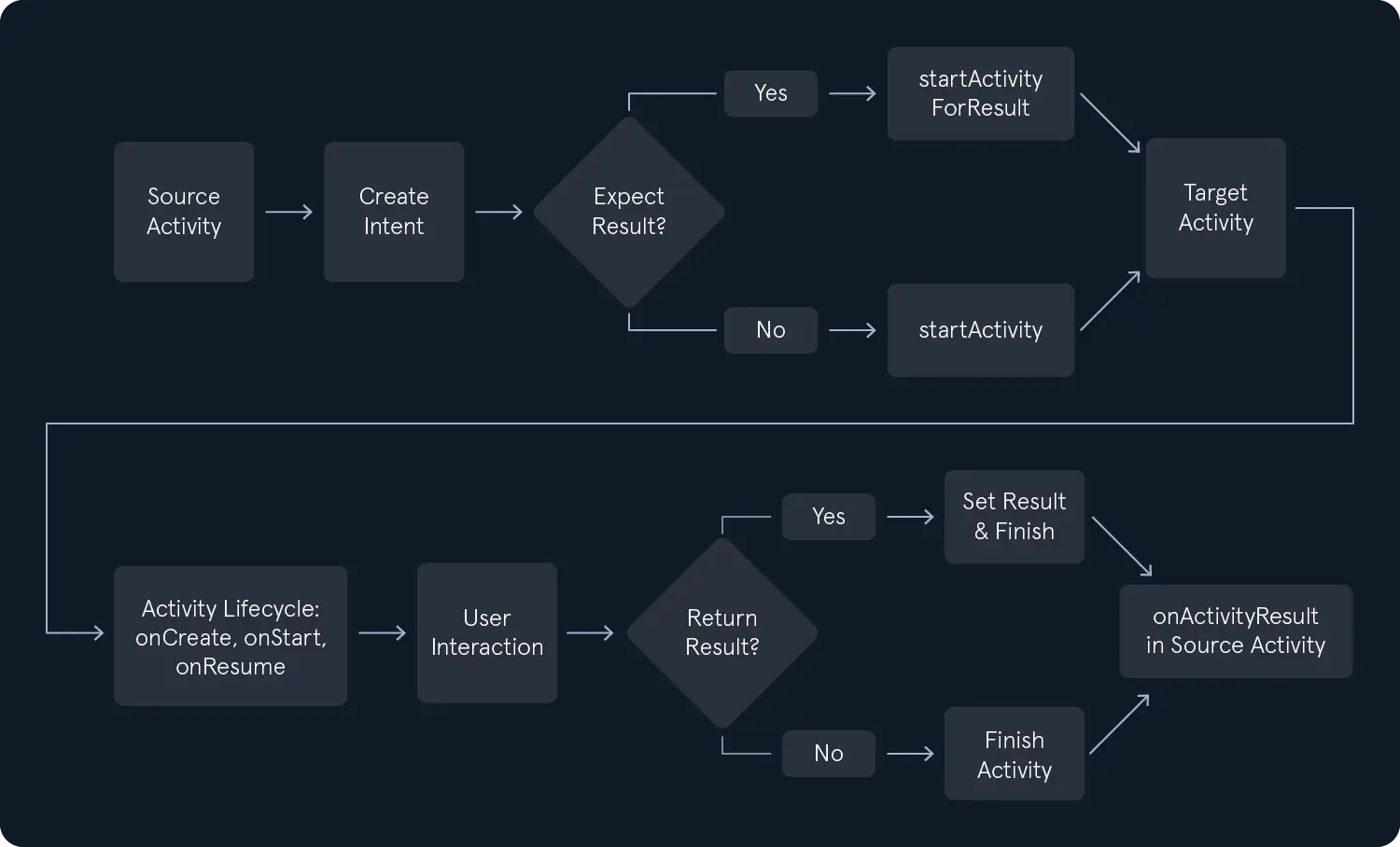
Next, the startActivity() or startActivityForResult() is called from the source Activity, passing the Intent object as a parameter. The startActivity() is used to launch an Activity without expecting any result back, while startActivityForResult() is used when we expect results from the launched Activity.
// For launching an Activity without expecting any result back
startActivity(intent);

// For launching an Activity and expecting a result back
int requestCode = 1; // A unique integer request code to identify the result
startActivityForResult(intent, requestCode);
/* Navigating from a list of contacts to a detailed view of the selected contact.
   In the source Activity (ContactListActivity.java), an explicit Intent tells
   Android to launch the target Activity (ContactDetailActivity.java) and passes
   the selected contact's ID as extra data. This allows the target activity to
   retrieve and display the correct contact details. */

Intent intent = new Intent(this, ContactDetailActivity.class);
intent.putExtra("contact_id", selectedContactId);
startActivity(intent);
Returning result in Android Activity Lifecycle - User Interaction
If the launched Activity was started using startActivityForResult(), it can return results to the calling Activity. This is done by calling setResult() in the launched Activity, followed by finish(). The calling Activity will then receive the result in its onActivityResult() method, where it can process the data accordingly. In the source Activity, the method that handles the results would look like this.
@Override
protected void onActivityResult(int requestCode, int resultCode, @Nullable Intent data) {
    super.onActivityResult(requestCode, resultCode, data);

    if (requestCode == 1) { // Match the request code used in startActivityForResult()
        if (resultCode == RESULT_OK && data != null) {
            String resultData = data.getStringExtra("result_key");
            // Process the result data
        }
    }
}
The following flowchart shows the above steps.
Starting a Services
- Services are used for background operations, and Intents are used to start or bind to them.
/* Downloading a file in the background. This code starts a background Service
   (DownloadService) to handle a file download. An explicit Intent specifies the
   target Service class and attaches the file URL as extra data. The Service can
   then retrieve the URL from the Intent and begin the download operation in the
   background. */

Intent intent = new Intent(this, DownloadService.class);
intent.putExtra("file_url", fileUrl);
startService(intent);
Delivering a Broadcast
Broadcasts allow apps to send or listen for system-wide or app-specific events.
/* Informing other components that the battery is low. This code sends a custom
   broadcast with the action string `com.example.ACTION_BATTERY_LOW`. Any component
   (within the same app or across apps) that has registered a BroadcastReceiver with
   a matching Intent filter will be notified when this broadcast is sent. */

Intent intent = new Intent("com.example.ACTION_BATTERY_LOW");
sendBroadcast(intent);
IPC
Explicit Intents
- Explicit Intents are commonly used for navigating between Activities within the same app or starting services
- The target component (activity, service, or broadcast receiver) should be known and can be created by specifying the target component's class name in the Intent constructor.
Intent intent = new Intent(this, TargetActivity.class);
startActivity(intent);
Implicit Intents
- Implicit Intents are used when we don't know the exact target component
- but know the action we want to perform and want the system to find a suitable component to handle the request
- To create an implicit Intent
- we must specify the action and the data (URI).
Intent intent = new Intent(Intent.ACTION_VIEW);
intent.setData(Uri.parse("https://www.example.com"));
startActivity(intent);
In addition, Intents can also carry data between components in the form of key-value pairs called extras.
Intent intent = new Intent(this, TargetActivity.class);
intent.putExtra("key", "value");
startActivity(intent);
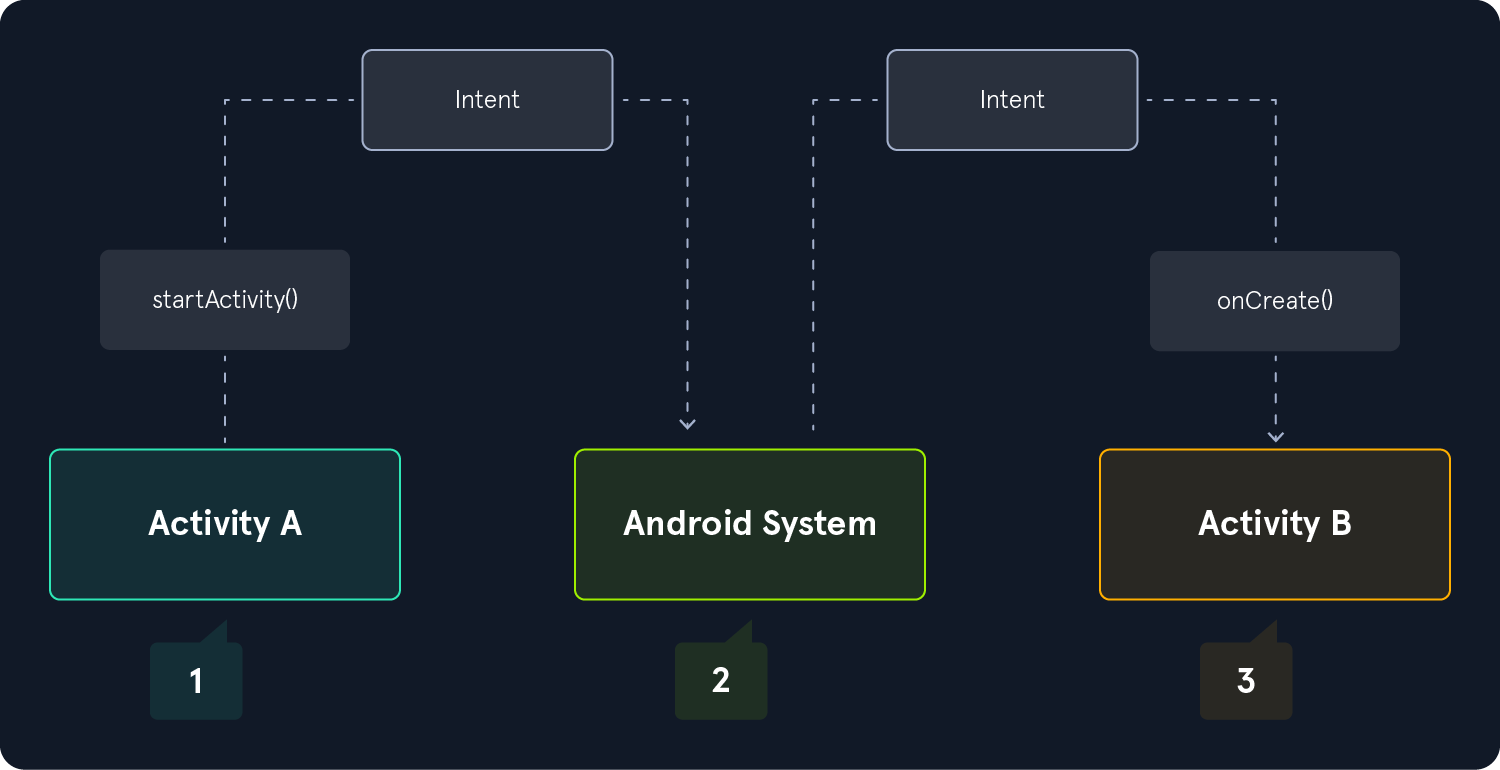
The following image shows how an implicit intent is delivered through the system to start another activity.
- Much like Application Components, Intents can be created using the Android Debug Bridge (ADB) through the terminal.
- Understanding and analyzing Intents while assessing an application is crucial—not only for gaining insight into the app’s flow but also for identifying potential security bypasses.