Enumeration refers to the systematic process of listing, counting, or detailing items individually, often in a specific order. This term is widely used across various disciplines, including mathematics, computer science, statistics, and everyday language.
In cybersecurity context, enumeration refers to the active process of extracting detailed information about a target system, network, or application. This phase is crucial in both ethical hacking and malicious activities, as it provides insights into potential vulnerabilities and attack vectors.
Overview
Enumeration is the process of extracting usernames, machine names, network resources, shares, and services from a system or network. In the enumeration phase, an attacker creates active connections with the system and sends directed queries to gain more information about the target. The attacker uses the information collected using enumeration to identify vulnerabilities in the system security, which help them exploit the target system. In turn, enumeration allows the attacker to perform password attacks to gain unauthorized access to information system resources. Enumeration techniques work in an intranet environment.
Information Collected During Enumeration
In particular, enumeration allows the attacker to collect the following information:
SNMP and fully qualified domain name (FQDN) details
Machine names
Users and groups
Applications and banners
During enumeration, attackers may stumble upon a remote inter-process communication (IPC) share, such as IPC$ in Windows, which they can probe further to connect to an administrative share by brute-forcing admin credentials and obtain complete information about the file-system listing that the share represents.
Legal Considerations
The previous modules highlighted how attackers gather necessary information about a target without any illegal activity. However, enumeration activities may be illegal depending on the organization's policies and the laws that are in effect. An ethical hacker or pen tester should always acquire proper authorization before performing enumeration.
Techniques for Enumeration
The following techniques are used to extract information about a target.
Extract usernames using email IDs
Every email address contains two parts, a username and a domain name, in the format "username@domainname."
Extract information using default passwords
Many online resources provide a list of default passwords assigned by manufacturers to their products. Users often ignore recommendations to change the default usernames and passwords provided by the manufacturer or developer of a product. This eases an attacker's task of enumerating and exploiting the target system.
Brute force Active Directory
Microsoft Active Directory is susceptible to username enumeration at the time of user-supplied input verification. This is a design error in the Microsoft Active Directory implementation. If a user enables the "logon hours" feature, then all the attempts at service authentication result in different error messages. Attackers take advantage of this to enumerate valid usernames. An attacker who succeeds in extracting valid usernames can conduct a brute-force attack to crack the respective passwords.
Extract information using DNS Zone Transfer
A network administrator can use DNS zone transfer to replicate DNS data across several DNS servers or back up DNS files. For this purpose, the administrator needs to execute a specific zone-transfer request to the name server. If the name server permits zone transfer, it will convert all the DNS names and IP addresses hosted by that server to ASCII text.
If the network administrators did not configure the DNS server properly, the DNS zone transfer can be an effective method to obtain information about the organization's network. This information may include lists of all named hosts, sub-zones, and related IP addresses. A user can perform DNS zone transfer using nslookup and dig commands.
Extract user groups from Windows
To extract user groups from Windows, the attacker should have a registered ID as a user in the Active Directory. The attacker can then extract information from groups in which the user is a member by using the Windows interface or command-line method.
Extract usernames using SNMP
Attackers can easily guess read-only or read-write community strings by using the SNMP application programming interface (API) to extract usernames.
Extract network resources and topology using SNMP
Attackers can methodically query the SNMP tree to gather detailed information about network resources and topology.
Services and Ports to Enumerate
Transmission Control Protocol (TCP) and User Datagram Protocol (UDP) manage data communications between terminals in a network.
TCP is a connection-oriented protocol capable of carrying messages or emails over the Internet. It provides a reliable multi-process communication service in a multi-network environment. The features and functions of TCP include the following:
Supports acknowledgement for receiving data through a sliding window acknowledgement system
Offers automatic retransmission of lost or acknowledged data
Allows addressing and multiplexing of data
A connection can be established, managed, or terminated
Offers quality-of-service transmission
Offers congestion management and flow control
UDP is a connectionless protocol that carries short messages over a computer network. It provides unreliable service. The applications of UDP include the following:
Audio streaming
Videoconferencing and teleconferencing
Common Services and Ports
Services and TCP/UDP ports that can be enumerated include the following.
TCP/UDP 53: DNS Zone Transfer
Concepts
DNS Concept
Description
Example
Domain Name
A human-readable label for a website or other internet resource.
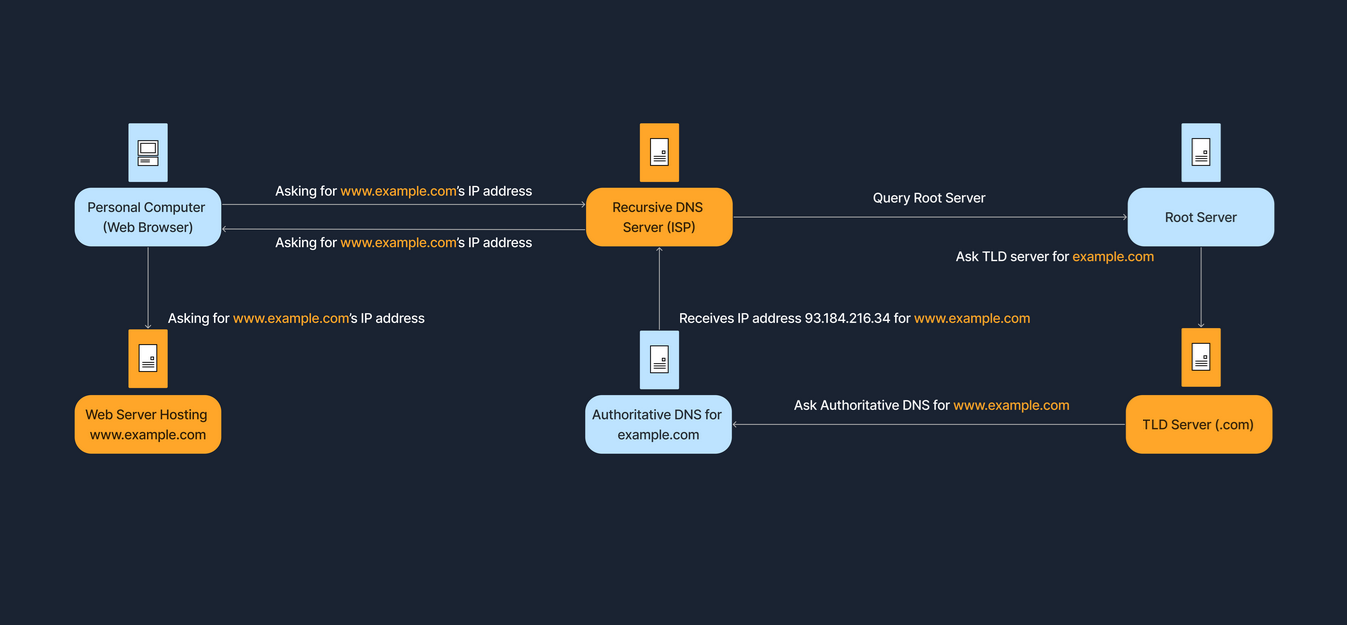
When you type a website address into your browser, your computer sends a request to a DNS server.
2.Local Cache Check:
The DNS server first checks its own cache for the IP address associated with that domain name. If found, the IP address is returned, and the process is complete.
3.Recursive Resolver:
If the IP address isn't in the cache, the DNS server (acting as a recursive resolver) queries other DNS servers to find the correct IP address.
4.Root Server:
The recursive resolver starts by querying a root server, which directs it to the appropriate top-level domain (TLD) server (e.g., .com, .org).
5.TLD Server:
The TLD server then directs the resolver to the authoritative nameserver for the specific domain.
6.Authoritative Server:
The authoritative nameserver, which holds the definitive information for that domain, provides the IP address to the recursive resolver.
7.Return Journey: The recursive resolver then sends the IP address back to your computer, allowing it to connect to the website.
DNS is organized like a tree, starting from the root and branching out into different layers.
Layer
Description
Root Servers
The top of the DNS hierarchy.
Top-Level Domains (TLDs)
Such as .com, .org, .net, or country codes like .uk, .de.
Second-Level Domains
For example, example in example.com.
Subdomains or Hostname
For instance, www in www.example.com, or accounts in accounts.google.com.
DNS Resolution Process (Domain Translation)
When we enter a domain name in our browser, the computer needs to find the corresponding IP address. This process is known as DNS resolution or domain translation. The steps below show how this process works.
Step
Description
Step 1
We type www.example.com into our browser.
Step 2
Our computer checks its local DNS cache (a small storage area) to see if it already knows the IP address.
Step 3
If not found locally, it queries a recursive DNS server. This is often provided by our Internet Service Provider or a third-party DNS service like Google DNS.
Step 4
The recursive DNS server contacts a root server, which points it to the appropriate TLD name server (such as the .com domains, for instance).
Step 5
The TLD name server directs the query to the authoritative name server for example.com.
Step 6
The authoritative name server responds with the IP address for www.example.com.
Step 7
The recursive server returns this IP address to your computer, which can then connect to the website’s server directly.
The DNS resolution process establishes communication between DNS clients and DNS servers. DNS clients send DNS messages to DNS servers listening on UDP port 53. If the DNS message size exceeds the default size of UDP (512 octets), the response contains only the data that UDP can accommodate, and the DNS server sets a flag to indicate the truncated response. The DNS client can now resend the request via TCP over port 53 to the DNS server. In this approach, the DNS server uses UDP as a default protocol. In the case of lengthy queries for which UDP fails, TCP is used as a failover solution. Malware such as [[ADM worm]] and [[Bonk Trojan]] uses port 53 to exploit vulnerabilities within DNS servers, helping intruders launch attacks.
The sources define various attacks targeting the Domain Name System (DNS), ranging from reconnaissance techniques used to gather information to active attacks designed to redirect traffic, compromise data, or cause denial of service.
DNS attacks are generally categorized as follows:
1. DNS Poisoning and Spoofing (Redirection and MITM)
DNS poisoning (also known as DNS spoofing or DNS cache poisoning) is an active attack in which an attacker manipulates the DNS infrastructure to redirect victims to malicious servers.
Definition and Goal: DNS poisoning tricks a DNS server into believing it has received authentic information when it has not. This results in the substitution of a false IP address at the DNS level where web addresses are converted into numeric IP addresses. The attacker replaces IP address entries for a target site on a DNS server with the IP address of a server they control.
Consequences: Once the victim is redirected to the attacker's server, the attacker can compromise the system and steal data, such as credentials. DNS poisoning is also listed as a method to facilitate Man-in-the-Middle (MITM) attacks.
Pharming: This technique is central to Pharming attacks, which are performed using DNS cache poisoning or host file modification to redirect users to a fraudulent website without using a phishing lure.
Key types of DNS spoofing include:
DNS Cache Poisoning: This involves altering or adding forged DNS records into the DNS resolver cache. If the DNS resolver cannot validate that the responses came from an authoritative source, it will cache the incorrect entries and serve them to users who request that domain.
Intranet DNS Spoofing: Performed on a switched Local Area Network (LAN), often in conjunction with the ARP poisoning technique. The attacker must be able to sniff the DNS request ID and send a malicious reply to redirect the client to a fake website.
Internet DNS Spoofing (Remote): Involves setting up a rogue DNS server and infecting the victim's machine (e.g., with a Trojan) to change the victim's DNS IP address to that of the attacker, thereby redirecting traffic to the attacker’s system.
Proxy Server DNS Poisoning: Achieved by setting up a proxy server on the attacker's system with a fraudulent DNS IP and then using a Trojan to change the victim's proxy server settings to redirect traffic to the fake website.
SAD DNS Attack: A variant of DNS cache poisoning that exploits side channels and flaws in DNS software to inject harmful records.
DNS Rebinding Attack: Attacks the same-origin policy by causing a malicious script running on the victim's web browser to resolve a hostname (often configured with a very short Time-to-Live, or TTL) to a new, internal IP address, allowing the script to attack local devices or private networks.
2. DNS Server Hijacking
DNS server hijacking is a distinct attack where the attacker compromises the DNS server itself and changes its DNS settings. This manipulation redirects all user requests meant for the legitimate target web server to the attacker's malicious server. DNS hijacking can be achieved by malware overriding a computer's TCP/IP configuration to point to a rogue DNS server or by modifying a trusted DNS server's behavior. It is also one of the common causes of website defacement.
3. DNS Attacks Used in Data Exfiltration and Evasion
DNS can be exploited for covert communication and data leakage, often to bypass security layers.
DNS Tunneling: Adversaries use this technique to obfuscate malicious traffic in legitimate traffic carried by common protocols. It allows an adversary to communicate with a command and control (C&C) server, bypass security controls (IDS/firewall), and perform data exfiltration. This works by embedding corrupt or malicious data, split into chunks, and encoded within DNS queries and responses, typically over UDP port 53. Notably, DNSSEC cannot detect abnormalities in DNS tunneling because the malicious data is covertly embedded within legitimate DNS traffic.
DNS Exfiltration via SQL Injection: Attackers use DNS lookups to extract data, such as password hashes, from a database server. The output of a malicious SQL query is embedded in a DNS request hostname (e.g., 0x4a6f686e.certifiedhacker.com) that is sent to a server controlled by the attacker. This technique is classified as Out-of-band SQL Injection.
4. DNS Attacks for Denial-of-Service (DoS/DDoS)
DNS is a target and a vector for large-scale DoS attacks.
DNS Amplification Attack: This is a volumetric DDoS attack technique that exploits recursive DNS queries. Attackers instruct compromised hosts (bots) to send DNS queries while spoofing the victim's IP address. The recursive DNS servers process these requests and flood the victim's spoofed IP address with a massive volume of DNS responses, overwhelming the victim's network bandwidth.
Protocol Vulnerabilities: Malware such as the ADM worm and Bonk Trojan uses TCP/UDP port 53 to exploit vulnerabilities within DNS servers to help intruders launch attacks.
Indicators of Compromise (IoC):Unusual DNS requests are listed as key Indicators of Compromise, suggesting a compromise or ongoing attack. Security professionals can detect DNS tunneling by analyzing malicious DNS requests, payload, unspecified domains, and destination addresses.
5. DNS Enumeration (Reconnaissance Phase)
DNS is targeted during the initial footprinting and reconnaissance phase to gather information about the target. Attackers use tools like DNSRecon, dig, and nslookup to obtain details that facilitate later attacks.
DNS Zone Transfer: If improperly configured, network administrators inadvertently allow attackers to replicate DNS data (the zone file) from a primary server. This exposes lists of all named hosts, sub-zones, hostnames, machine names, and IP addresses within the organization's network.
DNS Cache Snooping: Attackers query a DNS server to determine whether a specific DNS record is cached. If cached, this suggests a user recently visited that site, revealing sensitive information like vendor, service provider, or bank details, which can be used in social engineering attacks.
DNSSEC Zone Walking: Attackers attempt to obtain internal records of the DNS server if the DNS zone is not properly configured (exploiting vulnerabilities in DNSSEC NSEC records). This helps the attacker build a host network map.
Defense Against DNS Attacks
Effective countermeasures against DNS attacks involve architectural separation, strong configuration, and advanced security extensions:
DNSSEC Implementation: Implement Domain Name System Security Extensions (DNSSEC), a suite of specifications that provides cryptographic authentication of DNS data, authenticated denial of existence, and data integrity.
Restrict Access and Transfers:Restrict DNS zone transfers to specific slave nameserver IP addresses and disable transfers to untrusted hosts. Restrict DNS resolver access to internal hosts to prevent external cache poisoning.
Encrypt Traffic: Secure DNS queries by using DNS-over-HTTPS (DoH) or DNS-over-TLS (DoT) to encrypt DNS queries and responses, preventing eavesdropping and manipulation.
Disable Recursion:Disable DNS recursion in the DNS server configuration to restrict recursive queries from third-party domains, mitigating DNS amplification and poisoning attacks.
Split DNS Architecture: Implement a split DNS architecture where internal DNS queries are handled by a separate server from external sources, limiting the exposure of internal structure.
Source Port Randomization: Configure the DNS resolver to use a new random source port for each outgoing query to defend against cache poisoning.
Filtering and Rate Limiting: Configure DNS servers to limit the rate of accepted queries (rate limiting) to mitigate brute-force enumeration. Filter outgoing traffic and restrict DNS requests to external servers.
Patching and Monitoring: Regularly update and patch nameservers with the most recent software versions and monitor behavior to identify malicious activities.
NetBIOS, which stands for Network Basic Input/Output System, is a fundamental networking concept primarily addressed in the Enumeration phase of hacking. Attackers often focus on NetBIOS first because it allows the extraction of a large amount of sensitive information about the target network.
💡 Definition and Core Function
NetBIOS was initially designed as an API (Application Programming Interface) for client software to access Local Area Network (LAN) resources*. In Windows environments, NetBIOS is used specifically for file and printer sharing*.
NetBIOS Name: A NetBIOS name is a unique 16-character ASCII string used to identify network devices over TCP/IP.
15 characters are used for the device name.
The 16th character (suffix/endchar) is reserved for the service or name record type.
🔌 NetBIOS Ports and Services
NetBIOS utilizes three primary ports via UDP and TCP protocols:
The NetBIOS Name Service (NBNS) is also known as the Windows Internet Name Service (WINS). WINS maintains a database to match IP addresses with NetBIOS names and queries. Since attackers exploit this mapping process, the name service is often targeted first. Note that Microsoft does not support NetBIOS name resolution for IPv6.
🕵️ NetBIOS Enumeration and Information Gathered
NetBIOS enumeration involves creating active connections and sending directed queries to extract sensitive data. Attackers use NetBIOS enumeration to obtain:
The list of computers belonging to a domain.
The list of shares on individual hosts in the network.
Policies and passwords.
NetBIOS names, usernames, domain names, and MAC addresses.
The 16th character (NetBIOS code) is particularly revealing of the system's role:
NetBIOS Code
Information Obtained
<00>
Hostname or Domain name.
<03>
Messenger service running for the computer or logged-in user.
<20>
Server service running (File Service).
<1B>
Domain master browser name (identifies the Primary Domain Controller or PDC).
<1E>
Browser service elections.
🛠️ NetBIOS Enumeration Tools and Commands
Attackers use several methods and tools to perform NetBIOS enumeration:
Nbtstat Utility: This built-in Windows utility is used to troubleshoot name resolution problems. The command nbtstat -a <IP address> displays the NetBIOS name table of a remote computer. The command nbtstat -c displays the contents of the NetBIOS name cache.
Nmap: The Nmap Scripting Engine (NSE), using the nbstat.nse script, retrieves the target's NetBIOS names and MAC addresses.
Net View: This command-line utility displays shared resources of a remote host or workgroup. For example, net view \\<computername> /ALL displays all shares, including hidden ones.
Dedicated Tools:NetBIOS Enumerator (which enumerates names, usernames, domains, and MAC addresses), Global Network Inventory, Advanced IP Scanner, and Hyena.
AI Automation: Attackers can leverage tools like ChatGPT to generate commands such as nbtscan 10.10.1.11 or nmblookup -A 10.10.1.11 to automate the discovery process.
🛑 Countermeasures
Because a network running SMB (which historically relied on NetBIOS) is highly vulnerable to enumeration, key countermeasures include:
Disabling SMB Protocol: It is advisable to disable the SMB protocol on Web and DNS Servers and other Internet-facing servers because they do not require it.
Port Blocking: Block/disable the associated ports, specifically TCP 139 and TCP 445, and UDP 137 and 138.
Restrict Anonymous Access: Restrict anonymous access by adding the RestrictNullSessAccess parameter (set to 1 or enabled) to the Windows Registry.
SMB Version: Ensure all systems are using SMBv3 or higher to benefit from security enhancements like encryption, and avoid using SMBv1.
TCP 139: NetBIOS Session Service (SMB over NetBIOS)
The NetBIOS SSN (Session Service) refers to a service that operates over NetBIOS (Network Basic Input/Output System)
a protocol used for communication on local area networks (LANs)
The SSN service is used to provide file sharing and printer sharing functionality
commonly seen in older Windows networks and other systems that rely on NetBIOS over TCP/IP.
TCP 139 is perhaps the most well-known Windows port. It is used to transfer files over a network. Systems use this port for both null-session establishment as well as file and printer sharing. A system administrator considering the restriction of access to ports on a Windows system should make the restriction of TCP 139 a top priority. An improperly configured TCP 139 port can allow an intruder to gain unauthorized access to critical system files or the complete file system, resulting in data theft or other malicious activities.
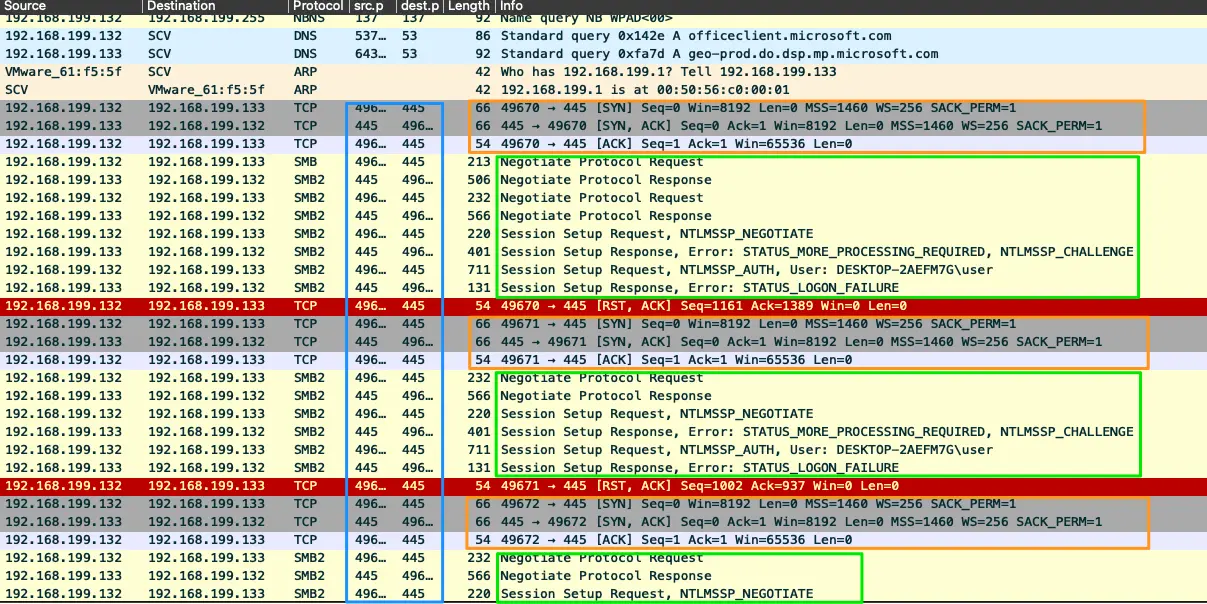
Windows supports file-and printer-sharing traffic using the SMB protocol directly hosted on TCP. In earlier OSs, SMB traffic required the NetBIOS over TCP (NBT) protocol to work on TCP/IP transport. Directly hosted SMB traffic uses port 445 (TCP and UDP) instead of NetBIOS.
LDAP is a protocol for accessing and maintaining distributed directory information services over an IP network. By default, LDAP uses TCP or UDP as its transport protocol over port 389.
If someone wants to access a file using NFS, an RPC call is placed to NFSD (the NFS daemon) on the server. This call takes parameters such as:
The file handle
The name of the file to be accessed
The user's, user ID
The user's group ID
Mounting
sudo mount -t nfs IP:share /tmp/mount/ -nolock
Option
Description
-t nfs
Type of device to mount, then specifying that it's NFS
IP:share
The IP Address of the NFS server, and the name of the share we wish to mount
-nolock
Specifies not to use NLM locking
Example
mount -t nfs 10.10.123.110:home /mnt/nfs -nolock
Install common NFS libraries
sudo apt install nfs-common
Listing Mounts
showmount -e 10.10.210.153
NFS protocol is used to mount file systems on a remote host over a network, and users can interact with the file systems as if they are mounted locally. NFS servers listen to its client systems on TCP port 2049. If NFS services are not properly configured, then attackers may exploit the NFS protocol to gain control over a remote system, perform privilege escalation, inject backdoors or malware on a remote host, etc.
SMTP is a TCP/IP mail delivery protocol. It transfers email across the Internet and across local networks. It runs on the connection-oriented service provided by TCP and uses the well-known port number 25. Below table lists some commands used by SMTP and their respective syntaxes.
SMTP uses mail exchange (MX) servers to direct mail via DNS. It runs on TCP port 25, 2525, or 587.
SNMP is widely used in network management systems to monitor network-attached devices such as routers, switches, firewalls, printers, and servers. It consists of a manager and agents. The agent receives requests on port 161 from the managers and responds to the managers on port 162.
SNMP (Simple Network Management Protocol) is a widely-used protocol for monitoring and managing network devices and systems. Despite its name suggesting simplicity, SNMP is quite powerful and comprehensive.
What SNMP Does
SNMP allows network administrators to:
Monitor network device performance and health
Collect statistics from routers, switches, servers, and other devices
Receive alerts when problems occur
Remotely configure certain device settings
Gather information about network traffic, errors, and resource utilization
Key Components
SNMP Manager: Software that requests information from network devices (like network monitoring systems)
SNMP Agent: Software running on managed devices that responds to requests and can send alerts
MIB (Management Information Base): A hierarchical database that defines what information can be monitored on each device type
SNMP Operations
GET: Retrieve specific information from a device GET-NEXT: Browse through MIB data sequentially GET-BULK: Efficiently retrieve large amounts of data SET: Modify configuration values on a device TRAP/INFORM: Unsolicited alerts sent by devices when events occur
SNMP Versions
SNMPv1: Original version, basic functionality, weak security (community strings in plaintext)
SNMPv2c: Added bulk operations and better error handling, still uses community strings
SNMPv3: Added strong authentication and encryption, user-based security
Common Use Cases
Network monitoring and alerting systems
Bandwidth utilization tracking
Server performance monitoring
Environmental monitoring (temperature, humidity in data centers)
Inventory management of network devices
Automated network configuration management
SNMP runs on UDP port 161 for regular operations and port 162 for traps/notifications. It's essential infrastructure for enterprise network management.
UDP 500: Internet Security Association and Key Management Protocol (ISAKMP)/Internet Key Exchange (IKE)
Internet Security Association and Key Management Protocol (ISAKMP)/Internet Key Exchange (IKE) is a protocol used to set up a security association (SA) in the IPsec protocol suite. It uses UDP port 500 to establish, negotiate, modify, and delete SAs and cryptographic keys in a virtual private network (VPN) environment.
Secure Shell (SSH) is a command-level protocol mainly used for managing various networked devices securely. It is generally used as an alternative protocol to the unsecure Telnet protocol. SSH uses the client/server communication model, and the SSH server, by default, listens to its client on TCP port 22. Attackers may exploit the SSH protocol by brute-forcing SSH login credentials. SFTP, by default, uses port 22, facilitating the secure exchange of data over a single Internet connection. This designated port for SFTP enhances its security and simplicity compared to protocols such as FTP/S that require multiple ports for operation. SFTP's reliance on just one port makes its use more straightforward while it continues to secure data transfers through SSH encryption. Attackers enumerate SFTP to gather information about user accounts, file and directory permissions, and the server's configuration.
TCP/UDP 3268: Global Catalog Service
Microsoft's Global Catalog server, a domain controller that stores extra information, uses port 3268. Its database contains rows for every object in the entire organization, instead of rows for only the objects in one domain. Global Catalog allows one to locate objects from any domain without having to know the domain name. LDAP in the Global Catalog server uses port 3268. This service listens to port 3268 through a TCP connection. Administrators use port 3268 for troubleshooting issues in the Global Catalog by connecting to it using LDP.
The Session Initiation Protocol (SIP) is a signaling protocol used for initiating, maintaining, and terminating communication sessions that include voice, video and messaging applications.
The Session Initiation Protocol (SIP) is a protocol used in Internet telephony for voice and video calls. It typically uses TCP/UDP port 5060 (non-encrypted signaling traffic) or 5061 (encrypted traffic with TLS) for SIP to servers and other endpoints.
FTP is a connection-oriented protocol used for transferring files over the Internet and private networks. FTP is controlled on TCP port 21, and for data transmission, FTP uses TCP port 20 or some dynamic port numbers depending on the server configuration. If attackers identify that FTP server ports are open, then they perform enumeration on FTP to find information such as the software version and state of existing vulnerabilities to perform further exploitations such as the sniffing of FTP traffic and FTP brute-force attacks.
It supports two modes for file transfer: binary and ASCII (text).
The FTP server may support either Active or Passive connections
In an Active FTP connection, the client opens a port and listens. The server is required to actively connect to it.
In a Passive FTP connection, the server opens a port and listens (passively) and the client connects to it.
FTP operates at the Application Layer of the OSI Model (Level 7) and allows users to upload and download files as well as manage files and directories on a remote server.
FTP is capable of running in two different modes, active or passive
Active is the default operational method utilized by FTP
Tha2t the server listens for a control commandPORT from the client stating what port to use for data transfer
Passive mode enables us to access FTP servers located behind Firewalls or a NAT-enabled link that makes direct TCP connections impossible
The client would send the PASV command and wait for a response from the server informing the client what IP and port to utilize for the data transfer channel connection.
Ports
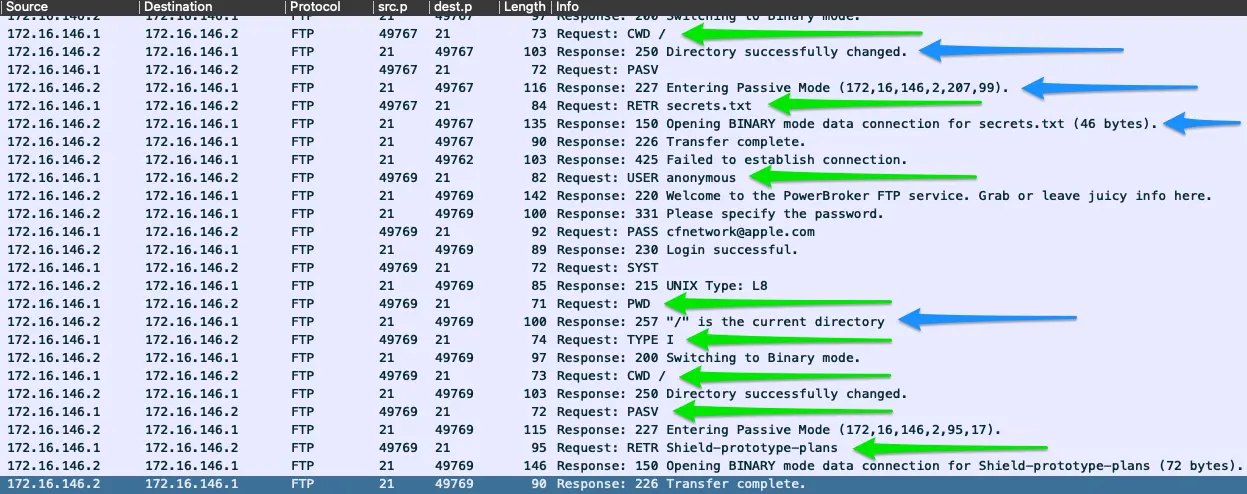
FTP uses ports 20 and 21 over TCP. Port 20 is used for data transfer, while port 21 is utilized for issuing commands controlling the FTP session.
Example
The image above shows several examples of requests issued over the FTP command channel green arrows
The responses sent back from the FTP server blue arrows
TCP 23: Telnet
Telecommunications Network
Plaintext client-server protocol
The Telnet protocol is used for managing various networked devices remotely. It is an unsecure protocol because it transmits login credentials in the cleartext format. Therefore, it is mostly used in private networks. The Telnet server listens to its clients on port 23. Attackers can take advantage of the Telnet protocol to perform banner grabbing on other protocols such as SSH and SMTP, brute-forcing attacks on login credentials, port-forwarding attacks, etc.
Sets the remote host, and optionally the port, for file transfers.
get
Transfers a file or set of files from the remote host to the local host.
put
Transfers a file or set of files from the local host onto the remote host.
quit
Exits tftp.
status
Shows the current status of tftp, including the current transfer mode (ascii or binary), connection status, time-out value, and so on.
verbose
Turns verbose mode, which displays additional information during file transfer, on or off.
TFTP is a connectionless protocol used for transferring files over the Internet. TFTP depends on connectionless UDP; therefore, it does not guarantee the proper transmission of the file to the destination. TFTP is mainly used to update or upgrade software and firmware on remote networked devices. It uses UDP port 69 for transferring files to a remote host. Attackers may exploit TFTP to install malicious software or firmware on remote devices.
Border Gateway Protocol (BGP) is a standardized exterior gateway protocol designed to exchange routing and reachability information among autonomous systems (AS) on the Internet. BGP is classified as a path-vector routing protocol
It makes routing decisions based on:
paths
network policies
rule-sets configured by a network administrator.
BGP used for routing within an autonomous system is called Interior Border Gateway Protocol (iBGP)
BGP is widely used by Internet service providers (ISPs) to maintain huge Routing Tables and for efficiently processing Internet traffic. BGP routers establish sessions on TCP port 179. The misconfiguration of BGP may lead to various attacks such as dictionary attacks, resource-exhaustion attacks, flooding attacks, and hijacking attacks.
Scanning vs Enumeration
The relationship between Scanning and Enumeration is defined by their position within the ethical hacking methodology, their goals, and the intensity and intrusiveness of the interaction they have with the target system. Both are critical post-reconnaissance steps, but Enumeration is generally considered a more focused and intrusive probing activity than Scanning.
Here is a detailed comparison and explanation of the concepts, objectives, and methods involved in Scanning versus Enumeration.
Comparison of Scanning and Enumeration
Feature
Scanning (Network Scanning)
Enumeration
Hacking Phase
Phase 2: Vulnerability Scanning (often following Reconnaissance/Footprinting)
Phase 2: Often grouped with Scanning, representing a subsequent, deeper probing action.
Relationship to Reconnaissance
A logical extension of active reconnaissance. Some experts do not differentiate scanning from active reconnaissance, but scanning involves more in-depth probing.
A method of intrusive probing.
Interaction Type
Gathering detailed information using highly complex and aggressive reconnaissance techniques.
Establishing active connections with a target system and performing directed queries.
Primary Goal
To identify live hosts, open ports, and running services. Also aims to discover the operating system (OS) and system architecture (fingerprinting).
To extract specific, granular information to identify potential attack vectors and perform password attacks to gain unauthorized access.
Information Gathered
Active hosts, IP addresses, open ports, services running on hosts, OS, system architecture, topology, and configuration lapses.
Usernames, machine names, network resources, shares, routing tables, users and groups, security flaws, SNMP and FQDN details, and application banners.
Typical Environment
Used to discover exploitable communication channels and probe listeners.
Enumeration techniques commonly work in an intranet environment.
Scanning Networks: Detailed Objectives and Techniques
Network Scanning (Module 03) refers to a set of procedures used for identifying hosts, ports, and services in a network. It is a component of information gathering that helps an attacker create a profile of the target organization.
The objectives of network scanning include:
Host Discovery: Identifying live hosts and their IP addresses using techniques like ICMP ping scans, TCP SYN ping scans, ARP ping scans, and UDP ping scans. This is the primary task in network scanning.
Port and Service Discovery: Listing the open ports and services running on those ports, often done by probing TCP and UDP ports to determine if services are in a listening state.
OS Discovery (Fingerprinting/Banner Grabbing): Determining the operating system running on a remote system to find associated vulnerabilities and exploits.
Vulnerability Scanning: Checking for the presence of known weaknesses and system exploitations.
Tools frequently used for scanning include Nmap, Hping3, Metasploit, and NetScanTools Pro.
Enumeration: Detailed Objectives and Techniques
Enumeration (Module 04) is the process of extracting critical information, which involves making active connections to a target system or subjecting it to direct queries. The information gathered is highly valuable for exploitation and performing password attacks.
Specific techniques and information extracted during enumeration include:
Extracting Usernames and Passwords:
Extracting usernames using email IDs (username@domainname).
Extracting information using default passwords assigned by manufacturers.
NetBIOS Enumeration (TCP port 139, UDP ports 137/138): Extracts a large amount of sensitive information, such as lists of computers belonging to a domain, lists of shares on individual hosts, and policies and passwords. Tools include the nbtstat utility and NetBIOS Enumerator.
SNMP Enumeration (UDP port 161): Extracts information about network resources (hosts, routers, devices, shares) and network details (ARP tables, routing tables) using default community strings. Tools include SnmpWalk and Nmap scripts.
LDAP Enumeration (TCP port 389): Queries the Lightweight Directory Access Protocol service anonymously to gather sensitive information like valid usernames, addresses, and departmental details.
SMTP Enumeration (TCP port 25): Uses commands like VRFY (validates users), EXPN (shows actual delivery addresses of aliases), and RCPT TO to determine valid users on the SMTP server.
DNS Enumeration: Techniques like Zone Transfer are used to obtain DNS server names, hostnames, machine names, usernames, IP addresses, and aliases within a target domain.
RPC, VoIP, NFS, and SMB Enumeration: Gathering details such as vulnerable services on RPC endpoints, VoIP gateway/servers and user extensions, shared directories on NFS servers, and OS banner grabbing on SMB service (port 445).
Overlap in Methodology
Both Scanning and Enumeration fall within the Reconnaissance stage of the CEH Ethical Hacking Framework, which is the overall preparatory phase for launching an attack.
An ethical hacker must answer the question, "What can an attacker see on the target system?" during the reconnaissance and scanning phases.
The output of scanning (e.g., live IP addresses and open ports) is often the direct input for the more aggressive and detailed queries performed during enumeration. For example, an attacker uses the details gathered during reconnaissance to scan the network for specific information.