banner grabbing
nmap --script banner example.com
Banners are service announcements provided by services in response to connection requests, and they often carry vendor version information. Banner grabbing is a simple method of fingerprinting that helps in detecting the vendor of a firewall and the firmware version. Knowing the exact version of the firmware or server can help create payloads that exploit known weaknesses without being detected by the IDS patterns. Banner grabbing identifies the services running on the system. The information obtained through banner grabbing includes details about the IDS or configurations of the target systems. This knowledge allows attackers to understand how an IDS is set up and tailor its actions to avoid known detection rules. Attackers can also use banner grabbing to discover the services running on firewalls. The three primary services that send out banners are FTP, Telnet, and web servers. A firewall does not block banner grabbing because the connection between the attacker’s system and the target system appears legitimate. An example of SMTP banner grabbing is telnet mail.targetcompany.org 25. The syntax is “<service name > <service running > <port number>”
Banner grabbing is used for specifying banners and application information. For example, when the user opens a telnet connection to a known port on the target server and presses Enter a few times, if required, it displays the following result:
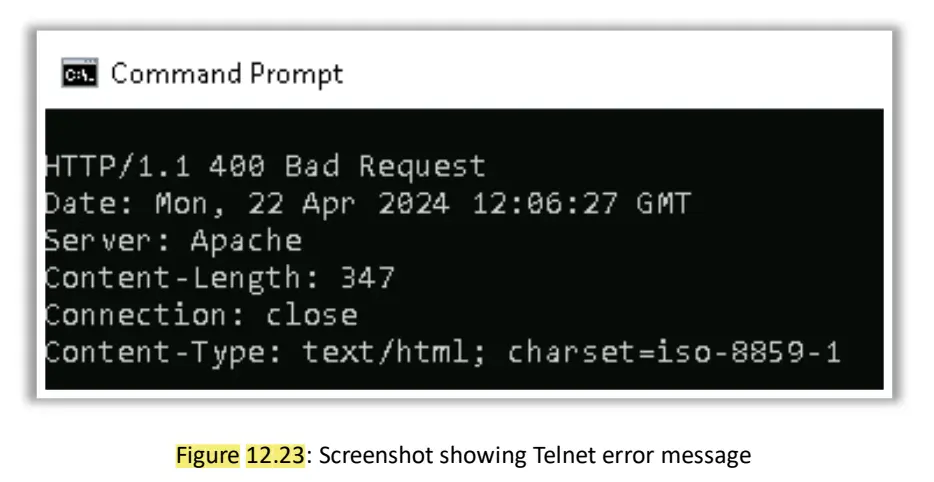
This system works with many other common applications that respond to a set port. The information generated through banner grabbing can boost the attacker’s efforts to further compromise the system. With information about the version and the vendor of the web server, the attacker can further focus on employing platform-specific exploit techniques. Services on ports such as FTP, Telnet,
and web servers should not remain open, as they are vulnerable to banner grabbing.
Banner grabbing, also known as OS fingerprinting or OS discovery, is a method used by attackers and security professionals during the network scanning phase to gain information about a remote computer system and the services running on its open ports.
Objectives and Importance
The primary objective of banner grabbing is to extract valuable system-level data from service announcements (banners):
- OS Identification: It determines the operating system (OS) running on the remote targe/tcpt system. Identifying the OS is critical because many vulnerabilities are OS-specific, allowing an attacker to choose the most effective exploits.
- Service/Version Identification: Banners are service announcements provided by network services in response to connection requests, and they often carry vendor and version information. This information helps the attacker identify specific vulnerabilities in the running application or server.
- Firewall Mapping: Banner grabbing can help detect the vendor of a firewall and its firmware version, which allows the attacker to understand how the security system is set up and tailor subsequent actions to avoid detection rules.
- Enumeration Context: Attackers performing SMB enumeration often perform banner grabbing to obtain OS details and versions of running services.
Types of Banner Grabbing
Banner grabbing techniques are categorized as active or passive:
1. Active Banner Grabbing
This technique involves direct interaction with the target system by sending specially crafted packets and analyzing the response.
- Mechanism: Active banner grabbing exploits the principle that an OS's IP stack has a unique way of responding to specially crafted TCP packets due to vendor differences in TCP/IP stack implementation(TCP sequence ability test).
- Process: The attacker sends a variety of malformed packets to the remote host, and the resulting responses are compared against a database to determine the OS fingerprint.
- Examples of Active Methods:
- Connecting to a service, such as an FTP site, to spot the banner.
- Using utilities like Telnet and Netcat to probe HTTP servers and receive the server field in the HTTP response header. Nmap uses a series of nine tests to determine an OS fingerprint.
- In the context of web servers, this is often explicitly called Web Server Footprinting.
2. Passive Banner Grabbing
This technique involves collecting information without direct interaction with the target system, leveraging existing network communications.
- Mechanism: Passive fingerprinting captures and studies packets from the target host via sniffing to find telltale signs that reveal the OS.
- Examples of Passive Methods:
- Banner grabbing from error messages: Error messages can reveal information such as the type of server, type of OS, and SSL tool used by the remote system.
- Sniffing the network traffic: Capturing and analyzing network packets from the target enables an attacker to determine the OS used by the remote system.
- Banner grabbing from page extensions: Looking at the file extension in a URL (e.g.,
.aspx) may assist in determining the application's version and implicitly the platform (e.g., IIS server and Windows platform).
Tools Used for Banner Grabbing
Common tools utilized to perform banner grabbing include:
- Telnet: Probes HTTP servers to retrieve the
Serverfield in the HTTP response header. - Nmap (Network Mapper): Used for OS detection (
-O) and can be used with the Nmap Scripting Engine (NSE) to extract information about the target server. - Netcat (nc): A networking utility that reads and writes data across network connections, commonly used for performing banner grabbing manually.
- Wget: Can be used to perform banner grabbing by suppressing normal output and printing the headers sent by the HTTP server.
- Other Tools: Httprecon, ID Serve, Netcraft, Uniscan, and Ghost Eye are also used for web server footprinting/banner grabbing.
Countermeasures against Banner Grabbing
To prevent sensitive information disclosure via banners, security teams can implement several countermeasures:
- Disable/Change Banner:
- Display false banners to mislead or deceive attackers.
- Use server masking tools to disable or change banner information.
- For Apache 2.x, modify the
httpd.conffile to change the banner information header or setServerSignature Off.
- Limit Information Disclosure:
- Turn off unnecessary services on the network host.
- Remove unnecessary HTTP headers and response data.
- Hide file extensions (e.g., replace
.aspwith.htm) to mask the web technology.
- Encrypt Traffic: Replace protocols that send clear-text banners (such as HTTP, FTP, and Telnet) with their secure counterparts (HTTPS, SFTP/FTPS, SSH) to encrypt the connection and banner information.
- Monitoring and Filtering:
- Use packet filtering to block or restrict access to ports that might reveal banner information unnecessarily.
- Use IDS/IPS systems to monitor and alert on scanning activities that could indicate banner grabbing attempts.