Concepts
| DNS Concept | Description | Example |
| Domain Name | A human-readable label for a website or other internet resource. | www.example.com |
| IP Address | A unique numerical identifier assigned to each device connected to the internet. | 192.0.2.1 |
| DNS Resolver | A server that translates domain names into IP addresses. | Your ISP's DNS server or public resolvers like Google DNS (8.8.8.8) |
| Root Name Server | The top-level servers in the DNS hierarchy. | There are 13 root servers worldwide, named A-M: a.root-servers.net |
| TLD Name Server | Servers responsible for specific top-level domains (e.g., .com, .org). | Verisign for .com, PIR for .org |
| Authoritative Name Server | The server that holds the actual IP address for a domain. | Often managed by hosting providers or domain registrars. |
| DNS Records Types | Different types of information stored in DNS. | A, AAAA, CNAME, MX, NS, TXT, etc. |
| | |
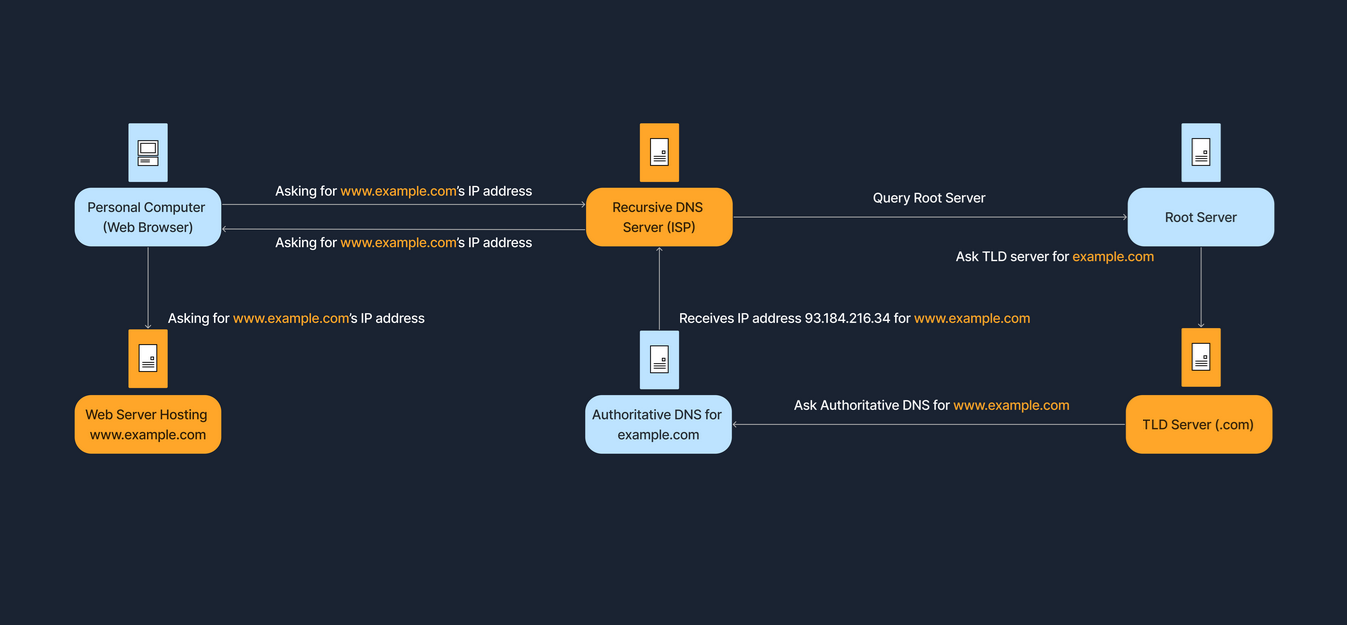
1. User Request:
When you type a website address into your browser, your computer sends a request to a DNS server.
2. Local Cache Check:
The DNS server first checks its own cache for the IP address associated with that domain name. If found, the IP address is returned, and the process is complete.
3. Recursive Resolver:
If the IP address isn't in the cache, the DNS server (acting as a recursive resolver) queries other DNS servers to find the correct IP address.
4. Root Server:
The recursive resolver starts by querying a root server, which directs it to the appropriate top-level domain (TLD) server (e.g., .com, .org).
5. TLD Server:
The TLD server then directs the resolver to the authoritative nameserver for the specific domain.
6. Authoritative Server:
The authoritative nameserver, which holds the definitive information for that domain, provides the IP address to the recursive resolver.
7. Return Journey:
The recursive resolver then sends the IP address back to your computer, allowing it to connect to the website.
ISP DNS Servers
- TCS Internet -
131.200.5.1
How to point a domain to Azure - Domains - Namecheap.com
How to Really Map a Namecheap URL to Your Static Azure Cloud Website | by John Conley | Medium
CNAME records
A Canonical Name or CNAME record is a type of DNS record that maps an alias name to a true or canonical domain name.
ecs vs dnssec
https://www.jeffgeerling.com/blog/2024/resolving-temporary-failure-name-resolution-on-pi-os-12-bookworm
DNS Hierarchy
DNS is organized like a tree, starting from the root and branching out into different layers.
| Layer | Description |
Root Servers | The top of the DNS hierarchy. |
Top-Level Domains (TLDs) | Such as .com, .org, .net, or country codes like .uk, .de. |
Second-Level Domains | For example, example in example.com. |
Subdomains or Hostname | For instance, www in www.example.com, or accounts in accounts.google.com. |
DNS Resolution Process (Domain Translation)
When we enter a domain name in our browser, the computer needs to find the corresponding IP address. This process is known as DNS resolution or domain translation. The steps below show how this process works.
| Step | Description |
Step 1 | We type www.example.com into our browser. |
Step 2 | Our computer checks its local DNS cache (a small storage area) to see if it already knows the IP address. |
Step 3 | If not found locally, it queries a recursive DNS server. This is often provided by our Internet Service Provider or a third-party DNS service like Google DNS. |
Step 4 | The recursive DNS server contacts a root server, which points it to the appropriate TLD name server (such as the .com domains, for instance). |
Step 5 | The TLD name server directs the query to the authoritative name server for example.com. |
Step 6 | The authoritative name server responds with the IP address for www.example.com. |
Step 7 | The recursive server returns this IP address to your computer, which can then connect to the website’s server directly. |
The DNS resolution process establishes communication between DNS clients and DNS servers. DNS clients send DNS messages to DNS servers listening on UDP port 53. If the DNS message size exceeds the default size of UDP (512 octets), the response contains only the data that UDP can accommodate, and the DNS server sets a flag to indicate the truncated response. The DNS client can now resend the request via TCP over port 53 to the DNS server. In this approach, the DNS server uses UDP as a default protocol. In the case of lengthy queries for which UDP fails, TCP is used as a failover solution. Malware such as [[ADM worm]] and [[Bonk Trojan]] uses port 53 to exploit vulnerabilities within DNS servers, helping intruders launch attacks.
The sources define various attacks targeting the Domain Name System (DNS), ranging from reconnaissance techniques used to gather information to active attacks designed to redirect traffic, compromise data, or cause denial of service.
DNS attacks are generally categorized as follows:
1. DNS Poisoning and Spoofing (Redirection and MITM)
DNS poisoning (also known as DNS spoofing or DNS cache poisoning) is an active attack in which an attacker manipulates the DNS infrastructure to redirect victims to malicious servers.
- Definition and Goal: DNS poisoning tricks a DNS server into believing it has received authentic information when it has not. This results in the substitution of a false IP address at the DNS level where web addresses are converted into numeric IP addresses. The attacker replaces IP address entries for a target site on a DNS server with the IP address of a server they control.
- Consequences: Once the victim is redirected to the attacker's server, the attacker can compromise the system and steal data, such as credentials. DNS poisoning is also listed as a method to facilitate Man-in-the-Middle (MITM) attacks.
- Pharming: This technique is central to Pharming attacks, which are performed using DNS cache poisoning or host file modification to redirect users to a fraudulent website without using a phishing lure.
Key types of DNS spoofing include:
- DNS Cache Poisoning: This involves altering or adding forged DNS records into the DNS resolver cache. If the DNS resolver cannot validate that the responses came from an authoritative source, it will cache the incorrect entries and serve them to users who request that domain.
- Intranet DNS Spoofing: Performed on a switched Local Area Network (LAN), often in conjunction with the ARP poisoning technique. The attacker must be able to sniff the DNS request ID and send a malicious reply to redirect the client to a fake website.
- Internet DNS Spoofing (Remote): Involves setting up a rogue DNS server and infecting the victim's machine (e.g., with a Trojan) to change the victim's DNS IP address to that of the attacker, thereby redirecting traffic to the attacker’s system.
- Proxy Server DNS Poisoning: Achieved by setting up a proxy server on the attacker's system with a fraudulent DNS IP and then using a Trojan to change the victim's proxy server settings to redirect traffic to the fake website.
- SAD DNS Attack: A variant of DNS cache poisoning that exploits side channels and flaws in DNS software to inject harmful records.
- DNS Rebinding Attack: Attacks the same-origin policy by causing a malicious script running on the victim's web browser to resolve a hostname (often configured with a very short Time-to-Live, or TTL) to a new, internal IP address, allowing the script to attack local devices or private networks.
2. DNS Server Hijacking
DNS server hijacking is a distinct attack where the attacker compromises the DNS server itself and changes its DNS settings. This manipulation redirects all user requests meant for the legitimate target web server to the attacker's malicious server. DNS hijacking can be achieved by malware overriding a computer's TCP/IP configuration to point to a rogue DNS server or by modifying a trusted DNS server's behavior. It is also one of the common causes of website defacement.
3. DNS Attacks Used in Data Exfiltration and Evasion
DNS can be exploited for covert communication and data leakage, often to bypass security layers.
- DNS Tunneling: Adversaries use this technique to obfuscate malicious traffic in legitimate traffic carried by common protocols. It allows an adversary to communicate with a command and control (C&C) server, bypass security controls (IDS/firewall), and perform data exfiltration. This works by embedding corrupt or malicious data, split into chunks, and encoded within DNS queries and responses, typically over UDP port 53. Notably, DNSSEC cannot detect abnormalities in DNS tunneling because the malicious data is covertly embedded within legitimate DNS traffic.
- DNS Exfiltration via SQL Injection: Attackers use DNS lookups to extract data, such as password hashes, from a database server. The output of a malicious SQL query is embedded in a DNS request hostname (e.g.,
0x4a6f686e.certifiedhacker.com) that is sent to a server controlled by the attacker. This technique is classified as Out-of-band SQL Injection.
4. DNS Attacks for Denial-of-Service (DoS/DDoS)
DNS is a target and a vector for large-scale DoS attacks.
- DNS Amplification Attack: This is a volumetric DDoS attack technique that exploits recursive DNS queries. Attackers instruct compromised hosts (bots) to send DNS queries while spoofing the victim's IP address. The recursive DNS servers process these requests and flood the victim's spoofed IP address with a massive volume of DNS responses, overwhelming the victim's network bandwidth.
- Protocol Vulnerabilities: Malware such as the ADM worm and Bonk Trojan uses TCP/UDP port 53 to exploit vulnerabilities within DNS servers to help intruders launch attacks.
- Indicators of Compromise (IoC): Unusual DNS requests are listed as key Indicators of Compromise, suggesting a compromise or ongoing attack. Security professionals can detect DNS tunneling by analyzing malicious DNS requests, payload, unspecified domains, and destination addresses.
5. DNS Enumeration (Reconnaissance Phase)
DNS is targeted during the initial footprinting and reconnaissance phase to gather information about the target. Attackers use tools like DNSRecon, dig, and nslookup to obtain details that facilitate later attacks.
- DNS Zone Transfer: If improperly configured, network administrators inadvertently allow attackers to replicate DNS data (the zone file) from a primary server. This exposes lists of all named hosts, sub-zones, hostnames, machine names, and IP addresses within the organization's network.
- DNS Cache Snooping: Attackers query a DNS server to determine whether a specific DNS record is cached. If cached, this suggests a user recently visited that site, revealing sensitive information like vendor, service provider, or bank details, which can be used in social engineering attacks.
- DNSSEC Zone Walking: Attackers attempt to obtain internal records of the DNS server if the DNS zone is not properly configured (exploiting vulnerabilities in DNSSEC NSEC records). This helps the attacker build a host network map.
Defense Against DNS Attacks
Effective countermeasures against DNS attacks involve architectural separation, strong configuration, and advanced security extensions:
- DNSSEC Implementation: Implement Domain Name System Security Extensions (DNSSEC), a suite of specifications that provides cryptographic authentication of DNS data, authenticated denial of existence, and data integrity.
- Restrict Access and Transfers: Restrict DNS zone transfers to specific slave nameserver IP addresses and disable transfers to untrusted hosts. Restrict DNS resolver access to internal hosts to prevent external cache poisoning.
- Encrypt Traffic: Secure DNS queries by using DNS-over-HTTPS (DoH) or DNS-over-TLS (DoT) to encrypt DNS queries and responses, preventing eavesdropping and manipulation.
- Disable Recursion: Disable DNS recursion in the DNS server configuration to restrict recursive queries from third-party domains, mitigating DNS amplification and poisoning attacks.
- Split DNS Architecture: Implement a split DNS architecture where internal DNS queries are handled by a separate server from external sources, limiting the exposure of internal structure.
- Source Port Randomization: Configure the DNS resolver to use a new random source port for each outgoing query to defend against cache poisoning.
- Filtering and Rate Limiting: Configure DNS servers to limit the rate of accepted queries (rate limiting) to mitigate brute-force enumeration. Filter outgoing traffic and restrict DNS requests to external servers.
- Patching and Monitoring: Regularly update and patch nameservers with the most recent software versions and monitor behavior to identify malicious activities.