Snort Rules
Rule Types
- snort.conf
- so_rules
- preproc_rules
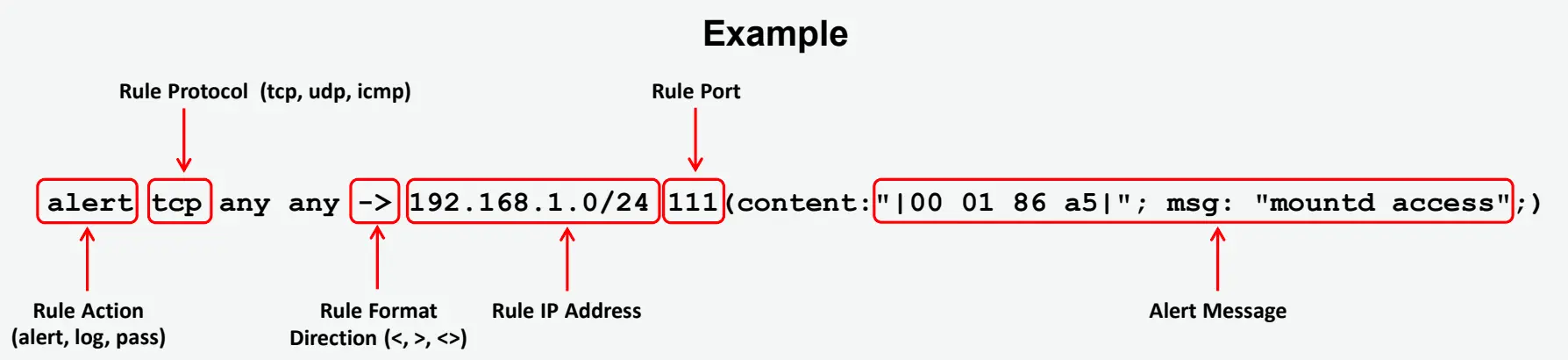
Snort Rules: Rule Actions and IP Protocols
The rule header stores a complete set of rules to identify a packet and determines the action to be performed or rule to be applied. It contains information that defines the who, where, and what of a packet, as well as what to do if a packet with all the attributes indicated in the rule should show up.
The first item in a rule is the rule action, which tells Snort what to do when it finds a packet that matches the rule criteria.
Snort Default Rule Actions
There are six available default actions in Snort:
- alert
- Purpose: Generates an alert when traffic matches a rule.
- Usage: This action is commonly used to notify an administrator of suspicious activity without interfering with the traffic. Alerts are typically logged to a file or passed to a monitoring system like an IDS (Intrusion Detection System).
- Example: Notifying about an attempted intrusion or other suspicious activity.
- log
- Purpose: Logs the traffic when a rule is matched but does not trigger an alert.
- Usage: This action is used when you want to keep a record of the matching traffic for later analysis without creating an immediate alert.
- Example: Logging traffic patterns for auditing or research purposes.
- pass
- Purpose: Ignores the matching traffic and does not take any action.
- Usage: This action tells Snort to allow the traffic to pass through, even though it matches a rule. This can be useful in scenarios where a specific known benign traffic should not be logged or alerted upon.
- Example: Disabling rules for trusted traffic like internal services.
- drop
- Purpose: Drops the matching traffic immediately without notifying the sender or logging the details.
- Usage: This action is used in active defense, where traffic that matches a rule (e.g., an attack) is dropped, preventing further processing of that traffic.
- Example: Blocking malicious traffic in real time.
- reject
- Purpose: Similar to
drop, but in addition to discarding the traffic, it also sends a TCP reset (RST) packet to the sender to notify them that the connection has been reset. - Usage: This is used when you want to terminate a connection and inform the sender that their traffic is being actively rejected.
- Example: Actively rejecting an attempted connection from an attacker.
- Purpose: Similar to
- sdrop
- Purpose: Similar to
drop, but it logs the dropped packets. - Usage: This action is used when you want to drop the traffic like in
drop, but you also want to keep a log entry for the dropped traffic. - Example: Blocking unwanted traffic while still keeping a record for further analysis.
- Purpose: Similar to
Snort Rules: IP Protocols
IP sends data from one system to another via the Internet. It supports unique addressing for every computer on a network. Data is organized into packets, each containing message data, source, destination, and more.
Snort supports three available IP protocols to tackle suspicious behavior:
-
TCP (Transmission Control Protocol)
- Connects two different hosts and exchanges data between them.
-
UDP (User Datagram Protocol)
- Used for broadcasting messages over a network.
-
ICMP (Internet Control Message Protocol)
- Used by operating systems to send error messages in a network.
Snort Rules: Direction Operator and IP Addresses
Direction Operator
This operator indicates the direction of interest for the traffic; traffic can flow either in a single direction or bidirectionally.
Example (Bidirectional Operator):
log tcp !192.168.1.0/24 any <> 192.168.1.0/24 23
IP Addresses
- Identify the IP address and port that the rule applies to.
- Use keyword
anyto define the IP address. - Use numeric IP addresses qualified with a CIDR netmask.
- You can also use the negation operator
!to exclude an IP/range.
Example (IP Address Negation Rule):
alert tcp !192.168.1.0/24 any -> 192.168.1.0/24 111 (content: "|00 01 86 a5|"; msg: "external mountd access";)
Snort Rules: Port Numbers
Port numbers can be listed in different ways:
anyports- Static port definitions
- Port ranges (
:operator) - Negation (
!)
The direction operator -> indicates the orientation/direction of the traffic.
- Left side = source host (IP + port)
- Right side = destination host (IP + port)
For bidirectional rules, use the operator <-> (there is no <- operator).
Multiple IPs
Snort can handle:
- A single IP address
- A list of addresses (comma separated, inside
[]) - CIDR ranges
- CIDR ranges inside lists
Example (IP List):
[192.168.1.1,192.168.1.45,10.1.1.24]
Examples of Port Negation
log tcp any -> 192.168.1.0/24 !6000:6010
Protocols and Examples
| Protocol | Rule Example | Explanation |
|---|---|---|
| UDP | log udp any -> 192.168.1.0/24 1:1024 | Log UDP traffic from any port to destination ports 1–1024 |
| TCP | log tcp any -> 192.168.1.0/24 :5000 | Log TCP traffic from any port going to ports ≤ 5000 |
| TCP | log tcp any -> 192.168.1.0/24 400: | Log TCP traffic from well-known ports going to ports ≥ 400 |