Transmission Control Protocol
Comparison with Hypertext Transfer Protocol
TCP Header
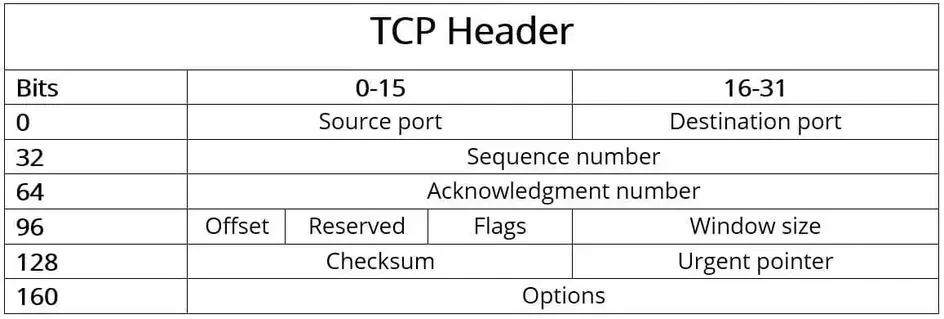
16 Bit Port = 65536
32 Bit SEQ, ACK
4 Bit DO (Offset)
3 Bit RSV
9 Bit Flags
16 Bit Window,Checksum and URG Pointer
IP header

[IP Header]
└─ Source IP: 192.168.1.10
└─ Destination IP: 192.168.1.20
[TCP Header]
└─ Source Port: 443
└─ Destination Port: 51515
TCP Flags
- URG
- The URG Flag indicates that the data being sent is urgent and should be prioritized
- FIN
- The FIN flag is used to gracefully terminate a TCP connection
- RST
- The RST flag is used to immediately terminate a connection
3 Way Handshake
- SYN
- SYN+ACK
- ACK
Termination
- FIN
- ACK+FIN
- ACK
TCP Based Protocols
| Protocol | Acronym | Port | Description |
|---|---|---|---|
| Telnet | Telnet | 23 | Remote login service |
| SSH | SSH | 22 | Secure remote login service |
| Simple Network Management Protocol | SNMP | 161-162 | Manage network devices |
| Hypertext Transfer Protocol | HTTP | 80 | Used to transfer webpages |
| Hyper Text Transfer Protocol Secure | HTTPS | 443 | Used to transfer secure webpages |
| Domain/Name/System | DNS | 53 | Lookup domain names |
| File Transfer Protocol | FTP | 20-21 | Used to transfer files |
| Trivial File Transfer Protocol | TFTP | 69 | Used to transfer files |
| Network Time Protocol | NTP | 123 | Synchronize computer clocks |
| Simple Mail Transfer Protocol | SMTP | 25 | Used for email transfer |
| Post Office Protocol | POP3 | 110 | Used to retrieve emails |
| Internet Message Access Protocol | IMAP | 143 | Used to access emails |
| Server Message Block | SMB | 445 | Used to transfer files |
| Network File System | NFS | 111, 2049 | Used to mount remote systems |
| Bootstrap Protocol | BOOTP | 67, 68 | Used to bootstrap computers |
| Kerberos | Kerberos | 88 | Used for authentication and authorization |
| Lightweight Directory Access Protocol | LDAP | 389 | Used for directory services |
| Remote Authentication Dial-In User Service | RADIUS | 1812, 1813 | Used for authentication and authorization |
| DHCP | DHCP | 67, 68 | Used to configure IP addresses |
| Remote Desktop Protocol | RDP | 3389 | Used for remote desktop access |
| Network News Transfer Protocol | NNTP | 119 | Used to access newsgroups |
| Remote Procedure Call | RPC | 135, 137-139 | Used to call remote procedures |
| Identification Protocol | Ident | 113 | Used to identify user processes |
| Internet Control Message Protocol | ICMP | 0-255 | Used to troubleshoot network issues |
| Internet Group Management Protocol | IGMP | 0-255 | Used for multicasting |
| Oracle DB (Default/Alternative) Listener | oracle-tns | 1521/1526 | The Oracle database default/alternative listener is a service that runs on the database host and receives requests from Oracle clients. |
| Ingres Lock | ingreslock | 1524 | Ingres database is commonly used for large commercial applications and as a backdoor that can execute commands remotely via RPC. |
| Squid Web Proxy | http-proxy | 3128 | Squid web proxy is a caching and forwarding HTTP web proxy used to speed up a web server by caching repeated requests. |
| Secure Copy Protocol | SCP | 22 | Securely copy files between systems |
| Session Initiation Protocol | SIP | 5060 | Used for VoIP sessions |
| Simple Object Access Protocol | SOAP | 80, 443 | Used for web services |
| Secure Socket Layer | SSL | 443 | Securely transfer files |
| TCP Wrappers | TCPW | 113 | Used for access control |
| Internet Security Association and Key Management Protocol | ISAKMP | 500 | Used for VPN connections |
| Microsoft SQL Server | ms-sql-s | 1433 | Used for client connections to the Microsoft SQL Server. |
| Kerberized Internet Negotiation of Keys | KINK | 892 | Used for authentication and authorization |
| Open Shortest Path First | OSPF | 89 | Used for routing |
| Point-to-Point Tunneling Protocol | PPTP | 1723 | Is used to create VPNs |
| Remote Execution | REXEC | 512 | This protocol is used to execute commands on remote computers and send the output of commands back to the local computer. |
| Remote Login | RLOGIN | 513 | This protocol starts an interactive shell session on a remote computer. |
| X Window System | X11 | 6000 | It is a computer software system and network protocol that provides a graphical user interface (GUI) for networked computers. |
| Relational Database Management System | DB2 | 50000 | RDBMS is designed to store, retrieve and manage data in a structured format for enterprise applications such as financial systems, customer relationship management (CRM) systems. |
Tasks of TCP/IP
| Task | Protocol | Description |
|---|---|---|
Logical Addressing | IP | Due to many hosts in different networks, there is a need to structure the network topology and logical addressing. Within TCP/IP, IP takes over the logical addressing of networks and nodes. Data packets only reach the network where they are supposed to be. The methods to do so are network classes, subnetting, and CIDR. |
Routing | IP | For each data packet, the next node is determined in each node on the way from the sender to the receiver. This way, a data packet is routed to its receiver, even if its location is unknown to the sender. |
Error & Control Flow | TCP | The sender and receiver are frequently in touch with each other via a virtual connection. Therefore control messages are sent continuously to check if the connection is still established. |
Application Support | TCP | TCP and UDP ports form a software abstraction to distinguish specific applications and their communication links. |
Name Resolution | DNS | DNS provides name resolution through Fully Qualified Domain Names (FQDN) in IP addresses, enabling us to reach the desired host with the specified name on the internet. |
3 Way Handshake
The TCP Connect/Full-Open Scan is a fundamental and reliable method of TCP port scanning used to identify open ports and services on a target machine. This technique is categorized as an Open TCP Scanning Method.
Reliability and Privileges
- Reliability: The TCP Connect scan is noted as one of the most reliable forms of TCP scanning.
- System Call: It works by asking the underlying operating system to establish a connection using the standard
connect()system call (part of the Berkeley Sockets API), similar to how web browsers and other network applications connect. - Privileges: This scan mode has the advantage that it does not require superuser privileges (raw packet privileges) because it relies on the operating system's network functions rather than writing raw packets. It is one of the scan types available to unprivileged users.
Performance and Detection
- Speed: Making a separate
connect()call for every targeted port linearly can take a long time over slow connections. Attackers can accelerate the scan by utilizing many sockets in parallel and using non-blocking I/O to set a short time-out period and watch all the sockets simultaneously. - Drawback (Detectability): The primary drawback of this scan type is that it is easily detectable and filterable. Because the full three-way handshake is completed, the logs in the target system will disclose the connection. This method is considered "noisy".
Nmap Implementation
In Nmap, the TCP Connect/Full-Open scan is specified using the -sT option.
- Command Example:
nmap -sT -v <Target IP>. - Default: The TCP Connect scan is the default TCP scan type when SYN scan is not an option (e.g., when the user lacks raw packet privileges or is scanning IPv6 networks).
In contrast to the TCP Connect scan, the Stealth TCP Scanning method (or Half-open Scan) uses only a SYN packet and immediately sends an RST to abruptly reset the connection before the handshake completes, which is done to bypass logging mechanisms.
TCP Three-Way Handshake
Overview
When two parties establish a connection using TCP, they perform a three-way handshake. A three-way handshake starts the connection and exchanges all the parameters needed for the two parties to communicate.
Connection Establishment
TCP uses a three-way handshake to establish a new connection. Initially, the client-side connection is in the closed state and the server-side is in the listening state.
Step 1: SYN (Synchronization)
The client initiates the connection by sending the initial sequence number (ISN) and setting the SYN flag. The client is now in the SYN-SENT state.
Step 2: SYN-ACK (Synchronization-Acknowledgement)
When the server receives this packet, it acknowledges the client sequence number and sends its own ISN with the SYN flag set. The server's state is now SYN-RECEIVED.
Step 3: ACK (Acknowledgement)
On receipt of this packet, the client acknowledges the server sequence number by incrementing it and setting the ACK flag. The client is now in the ESTABLISHED state.
At this point, the two machines have established a session and can communicate. On receiving the client's acknowledgement, the server enters the ESTABLISHED state and sends an acknowledgment, incrementing the client's sequence number.
Connection Termination
The connection can be closed either by using the FIN or RST flag or through a timeout.
RST Flag (Reset)
If the RST flag of a packet is set, the receiving host enters the CLOSED state and frees all resources associated with this connection. This leads to the connection drop of any additional incoming packets.
FIN Flag (Finish)
If the packet is sent with the FIN flag turned on, the receiving host closes the connection because it enters the CLOSE-WAIT state.
Sequence Number Validation
The packets sent by the client are accepted in an established connection if the sequence number is within the range and follows its predecessor. If the sequence number is beyond the range of the acceptable sequence numbers, the receiving host drops the packet and sends an ACK packet using the expected sequence number.
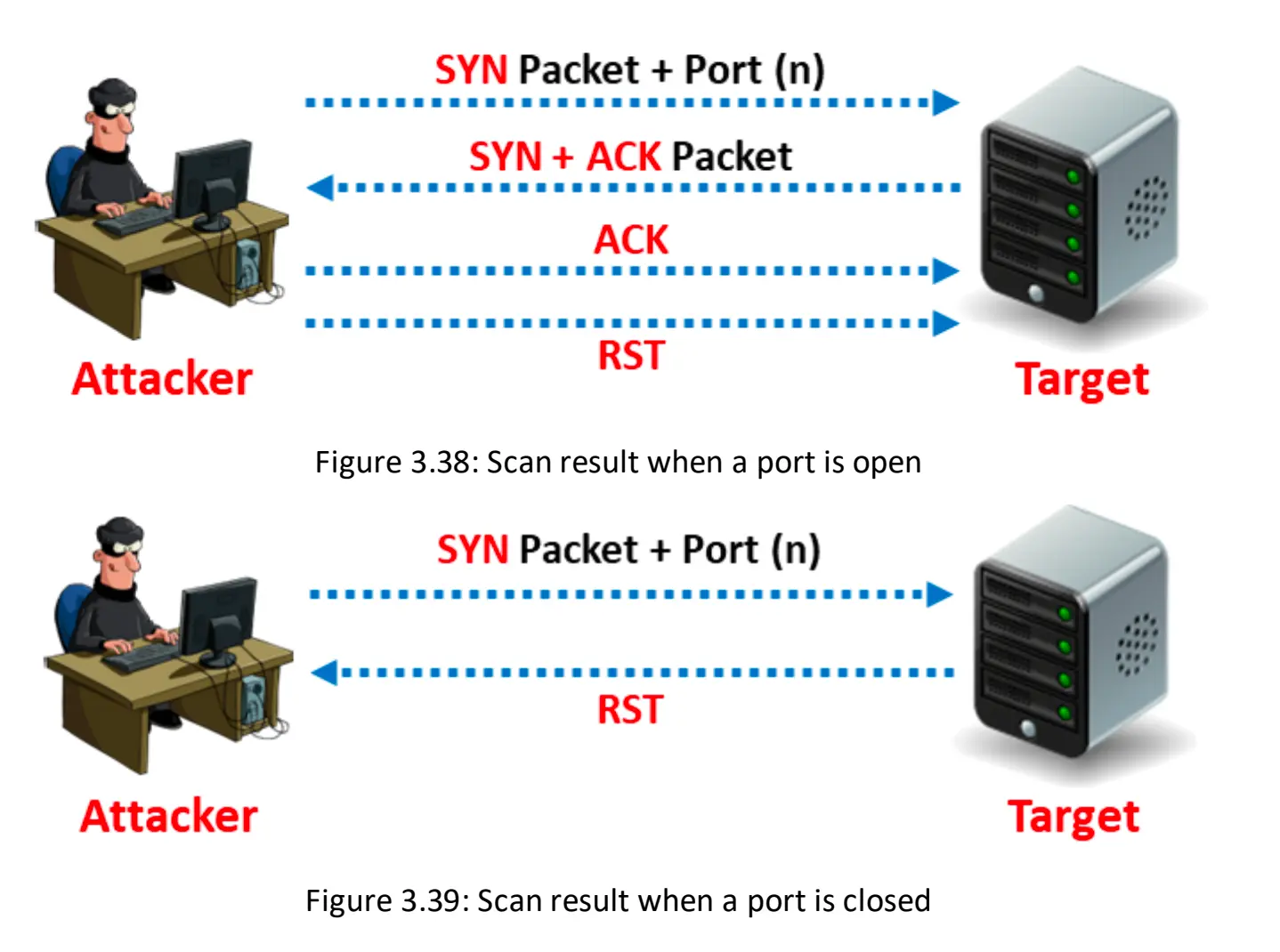
nmap -sT 192.168.64.5 > tcp.connect.txt